Languages
 DE
DE

Application Lifecycle Management (ALM) solutions can provide valuable support for implementing agile development processes and integrating them into daily workflows. ALM tools offer a unified environment for managing all development activities, as well as for cross-functional and cross-departmental communication and collaboration among software development teams, testing departments, customer support, and other stakeholders.
If specialized tools such as DOORS, Jira, or Jenkins are used for different tasks within a development environment, ALM tools can help integrate these tools into a common development process. To this end, they provide functions to maintain an overview of project progress and ensure traceability between individual work products.
One example of this is PTC’s ALM platform, codebeamer. A central tool for managing project information, artifacts, requirements, change requests, roles, and relationships in codebeamer are so-called trackers—a type of generic artifact (see Figure 1).
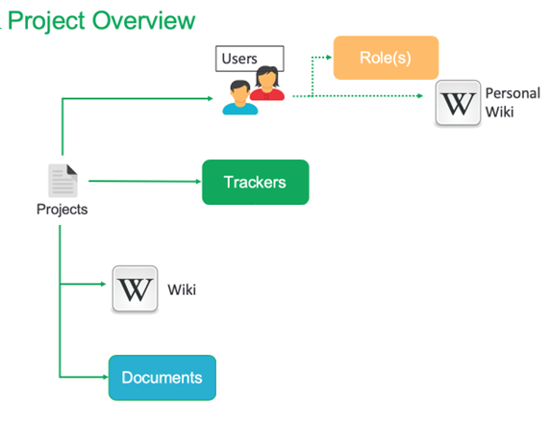
Trackers can be used to define, manage, and track all artifacts, such as requirements, issues, bugs, test cases, and other work items. Each tracker can be customized to meet specific project requirements. It can have its own attributes, workflows, statuses, and rules to manage the lifecycle of artifacts. Trackers can map relationships between artifacts and track their progress over time. They thus enable better management of the software development process and ensure that requirements are implemented, issues are resolved, and tests are conducted in a traceable manner.
Linking the individual trackers creates end-to-end traceability of development artifacts. Requirements can be linked to implementation tasks, change requests, bug reports, and test cases. This makes it possible to track at any time which requirements have already been implemented, what changes were made during development, and which tests were used to verify the respective functions. Especially in larger projects, this traceability supports the analysis of the impact of planned changes and facilitates the documentation of development progress.
In addition to managing artifacts, trackers also support the management of development processes. Typical status transitions range from the creation of a work package through implementation and integration to successful verification through testing. This allows project progress to be documented transparently and the current status of individual tasks to be tracked at any time.
Trackers can be easily added for use in projects. You can use sets of predefined trackers or define and configure user- and process-specific trackers individually. Links can be established not only between trackers but also with other codebeamer elements, documents, and even external sources.
In a typical development process, work packages do not arise in isolation but are derived from existing development artifacts. New tasks can be triggered, for example, by requirements, change requests, or reported bugs. By linking these elements, it remains traceable at all times which business or technical origin an implementation task stems from. This facilitates both the planning and the subsequent analysis and documentation of the development process.
Traceability does not end at the level of requirements or test cases. Changes to the source code can also be linked to the corresponding work packages via appropriate references. This makes it possible to determine later which implementations were carried out to fulfill a specific requirement or to fix a bug. The connection between requirements, implementation, and testing thus creates a consistent information base throughout the entire development cycle. Figure 2 shows possible relationships between the development artifacts mapped by Tracker

In test management, trackers can be used to control the test process within an integrated tool environment. An example is shown in Figure 3. This figure illustrates a continuous integration scenario. In this case, the test object is the software simulation of an emergency braking maneuver in conjunction with a vehicle’s turn signal system.
In the demonstrated scenario, the behavior of automatic emergency brake warning flashers is examined. To do this, the test platform simulates a driving condition in which a vehicle first accelerates to 120 km/h and then brakes down to 60 km/h. During this braking process, the software is supposed to automatically activate the emergency brake warning flashers. After a defined period of time, the system reverts to the previously active turn signal. The test case verifies whether the software correctly executes the intended state changes and generates the expected reactions in the respective driving situations.
Jenkins, which manages the CI process, connects the rest of the test environment to the ALM tool via a REST API. The data flow between codebeamer and Jenkins is controlled via Curl and Groovy scripts (see Figure 3).
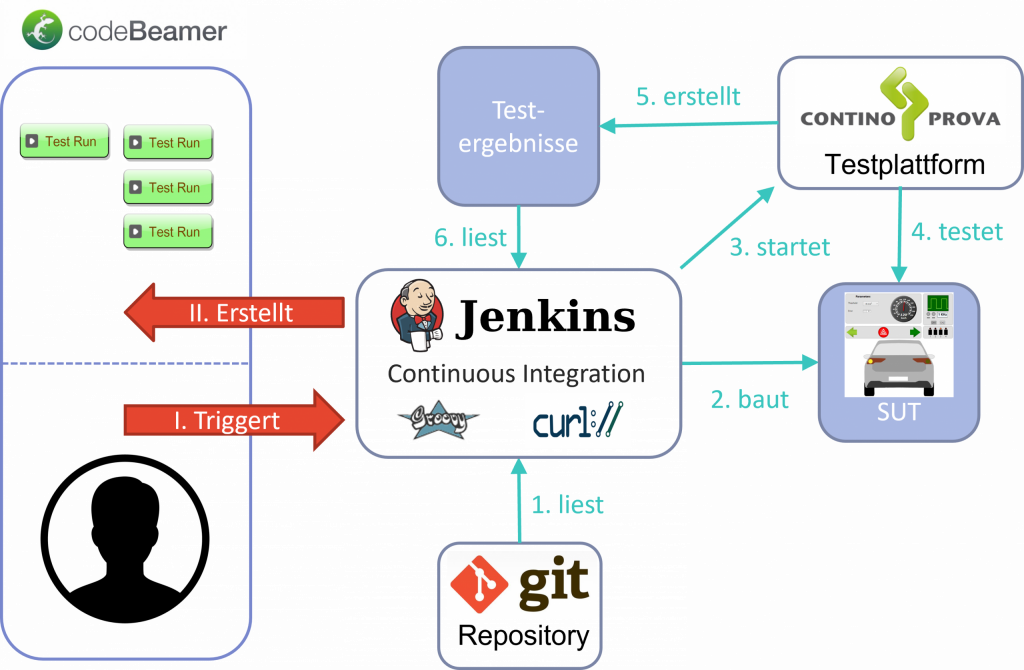
In this example, the process is initiated manually in Codebeamer and can be monitored and controlled using appropriate trackers.
First, Jenkins compiles the source code of the system under test (SUT) from the repository. Then, ContinoProva launches the test execution. The test results are returned to Codebeamer upon completion of the test runs, and the associated trackers are automatically updated with the new information.
The integration of the tools involved creates a continuous information chain throughout the entire development and testing process. Requirements, implementation tasks, source code changes, test cases, and test results remain linked and can be evaluated together. If errors occur during a test run, it is easy to determine which requirements are affected, which changes were last made, and which test results are associated with the respective work package.
Especially in agile development projects with frequent changes and short release cycles, such a toolchain significantly supports quality assurance. Through the automated provision and linking of information, manual effort can be reduced and development decisions can be made based on a consistent data foundation.
ALM tools can thus be used for enhanced test management. They offer a wide range of possibilities, but these must be precisely tailored to existing processes and tools. With proper planning and preparation, efficient automation solutions can be created and adapted for use in your own test process.
ITPower Solutions supports companies in the introduction and adaptation of ALM platforms, the integration of continuous integration processes, and the implementation of automated testing solutions. We accompany our customers from the design of suitable toolchains through the integration of existing systems to the implementation of customized automation and test management solutions.

I am your sales representative and will be happy to advise you on all questions relating to our services and products! Get in touch or simply make an appointment for a free consultation call.
Sebastian Stritz
E-Mail: sebastian.stritz@itpower.de
Phone: +49 (0)30 6098501-17